I have just finished a new project: emu_x86, an emulator of two classic PCs. The same C code runs in a web page (as WebAssembly) and on Linux, so you can open a link and have a DOS computer on the screen. Nothing is installed on your computer.
You can try it now: a 386 PC that boots FreeDOS from a small hard disk image. Click the screen to type.
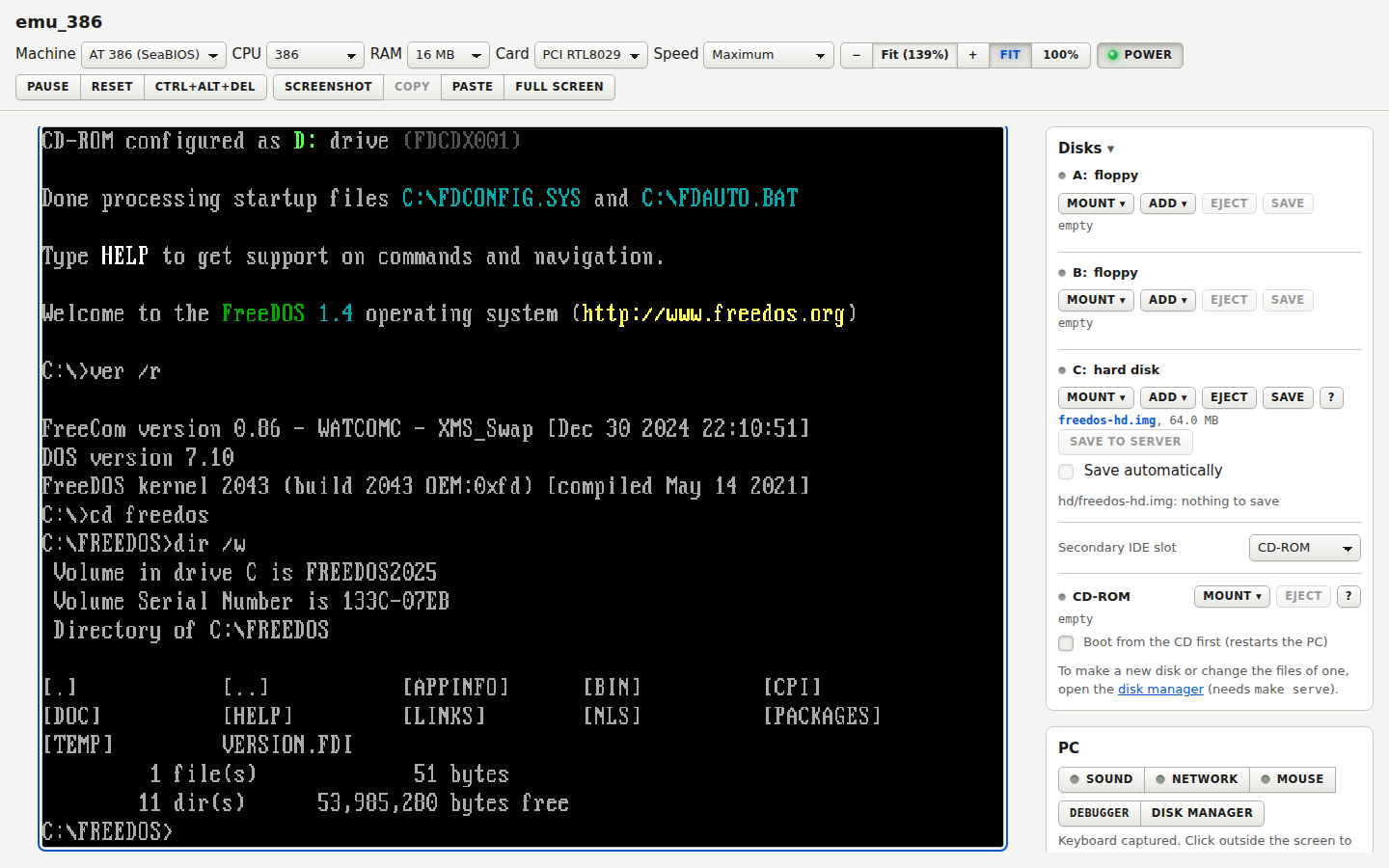
This is the first of two articles. This one tells what the emulator is and how the two PCs were built. Part 2 covers the tools around it: a disk manager, a debugger, a command line for scripts and a native window.
The two PCs
| IBM PC/XT | 386 PC | |
|---|---|---|
| CPU | Intel 8088, 4.77 MHz | 386 (also 486, Pentium or Pentium II) |
| Firmware | GLaBIOS | SeaBIOS and SeaVGABIOS |
| Video | MDA and CGA | VGA with VESA modes up to 1600x1200 |
| Sound | PC speaker | PC speaker, Sound Blaster 16 with FM |
| Disks | Floppies, a hard disk, a CD-ROM | Floppies, an IDE hard disk, a bootable CD-ROM |
| Network | NE1000 | RTL8029 or NE2000 |
| RAM | 640 KB | 16 MB by default |
Both PCs reach the Internet through a small network inside the server, so a DOS web browser or an FTP client in the PC works. They boot MS-DOS, FreeDOS, Windows 3.1, Windows 3.11, Windows 95, and old versions of Linux and FreeBSD from ordinary disk images. MS-DOS and Windows are not part of the project: you bring your own disks. Free FreeDOS images for both PCs are in a separate repository.
One core, two hosts
The emulator core is portable C with no calls to the operating system. That is what lets the same code run in two places:
- in the browser, compiled to WebAssembly with Emscripten, with a web page of plain HTML and ES modules around it;
- on Linux, as a command line program and as a native SDL2 window.
The command line build matters more than it seems. All the tests run there, with no browser, and it is the base of the scripting tool in Part 2.
Starting with the XT
I began with the IBM PC/XT because MS-DOS 1.x to 6.x runs on it and it has the smallest scope. For the 8088 I did not write a new core. I took the one from VirtualXT, which already passes the full SingleStepTests suite for the 8088, and kept it unchanged. The rest is the chipset around it: the interrupt controller, the timer, the DMA controller, the keyboard, the floppy controller, and MDA and CGA video.
Getting the chips to talk to a real BIOS took small details. GLaBIOS checks the DMA counter at the end of the memory test and reports an error if the refresh requests of the timer did not arrive. It also reads only one of the four interrupts that a floppy reset leaves, so the stale ones answered its first recalibrate and failed the self test. None of this is in a data book. The BIOS found it.
The 386 core
For the 386 there was no core to borrow: VirtualXT has no 386 mode, and the other cores I know are GPL, which would change the licence of the project. So the 386 core is new. It supports real mode, protected mode, V86 mode, paging (also PAE on the Pentium II model) and a 387 FPU. It is an interpreter. Each segment register keeps a descriptor cache, and a fault leaves the state of the first byte of the instruction.
How do you know a CPU core is right? Two sources:
- The SingleStepTests data for the 80386 gives the result of each instruction on a real 386EX. I took undefined behaviour from this data and not from the manuals, for example the flags after a shift.
- The SingleStepTests have no protected mode. For that, small test programs print their exception frames and registers, and a script compares the output with
qemu-system-i386. The programs avoid the few things where QEMU differs from the real chip.
The 486, Pentium and Pentium II models are one core with a switch. An instruction from a later chip raises an invalid opcode error on an earlier model, so a program that detects the CPU sees the right one.
Making a PC that SeaBIOS accepts
For the 386 PC I use SeaBIOS, the BIOS of QEMU. This decided the shape of the hardware. SeaBIOS finds the disks and the video ROM only through PCI, and it decides that it runs on QEMU from the id of the host bridge. So the 386 PC is a QEMU look-alike: a 440FX host bridge, a PIIX3 ISA bridge with an IDE function, and a standard VGA with the Bochs VESA extensions.
One detail cost me some time: SeaBIOS prints nothing until the port 402h answers E9h on a read. Until I found that, it looked like a hang.
Other small facts came the same way. The CPU keeps the segment limit on a real-mode segment load, because HIMEM uses “unreal mode” and looped for ever without it. SeaBIOS uses the BSWAP instruction in its CD code. BSWAP is a 486 instruction, and the CD boot crashed on the 386. Accepting BSWAP in the CPU would let the 386 run code that a real 386 cannot, so I patched SeaBIOS to swap bytes in C instead.
What runs on it
The list grew by testing real systems:
- MS-DOS 6.22 boots in about 30 seconds in the browser. EMM386 gives expanded memory, and programs built with DJGPP and Watcom run under it.
- Windows 3.11 installs from an ISO image on a new disk, after MS-DOS 6.22 was installed from its setup floppies. It runs in standard and 386 enhanced mode, with DOS boxes and the mouse. This test found two faults in the core: a streamed disk write that stayed busy, and the 16-bit TSS that Windows loads in standard mode.
- Linux 2.2.16 (Slackware 7.1) boots to a shell. Linux drives the floppy controller itself and polls the disk change line, which read as “changed” all the time, so it never loaded the root disk.
- FreeBSD boots as well, after the IDE bus master registers were added. Its disk driver resets a channel through them and panicked without.
Each of these runs found a bug that no unit test had found, which is the reason I keep trying bigger systems.
Sound, disks and speed
The PC speaker is sampled into 22050 Hz frames, so both tones and programs that toggle the speaker bit themselves can be heard. The 386 adds a Sound Blaster 16, with FM synthesis written from the YM3812 data sheet. It is not bit exact. The page plays one stream per machine with an AudioWorklet.
Disk images up to 256 MB are copied into WebAssembly memory and kept in the browser (IndexedDB). A bigger 386 disk is streamed: the IDE controller keeps a cache of 64 KB chunks and stays busy while the page reads a missing chunk from the file, or from a web address with range requests. A 1 GB disk then needs only a few requests. CD images are always streamed.
The core is an interpreter. It runs about 20 million instructions per second on a native build and about 15 million in the page. The emulated 386 is set to 10 million per second, so a guest is not slow; it is just not fast. The profile of a long Linux boot shows that the next big step for speed is a cache of decoded instructions.
Limits
The XT has MDA and CGA only. The 386 core runs no MMX and SSE, has no NX bit and no APIC. The CD-ROM reads data discs only, no audio. The network has no IPv6. The source code is not public yet.
In Part 2 I describe the disk manager, the debugger, emuctl and the native window.