This continues Part 1, which described the machine and the core of emu_ns. An emulator is only as useful as the software you can run on it, and on this machine software means disks. This part is about disk images, the hard disk board, a tool that reads the images, and a disk full of CP/M programs.
Disk images
There are two kinds of image:
- Floppy,
.NSI: 179,200 bytes for a single-sided disk and 358,400 bytes for a double-sided one. - Hard disk,
.NHD: whole 512-byte sectors, from 8 KB up to 48 MiB, starting with a label of two bytes,00 FF.
The images are not in the code repository. They live in a separate one, emu_ns-disks, which is public and also serves as the disk host of the browser version: the page reads a catalog from it and fetches an image only when you mount it. In the browser, what you change or add stays in your browser, and a button discards your copy so the original comes back. Nothing on the disk host changes.
The emulator also keeps an HFE copy of each floppy for a Gotek or an HxC, the same kind of Gotek that I fitted to the real machine in Part 4 of the restoration. I checked every header and track table of those files, but I have not yet loaded one on a real machine.
Mounting without losing a disk
The reference emulator never writes a disk back until you save it. For a program that can hold your files, I wanted the opposite: writes go to the file, and it never loses a disk by accident. The rules came one at a time, each one from a test:
- Three mount modes. Read-write, read-only (the disk is write-protected) and copy (changes go to a temporary file that is deleted on eject, so the original is never touched). Ejecting and mounting again is the “revert”.
- The same image in both drives is refused, unless neither can change it. Each drive keeps its own one-track cache, so two read-write mounts overwrote each other without any error.
- Write-back happens when the track changes, after 60 frames without writes, on eject and when the emulator stops, also on Ctrl+C and on a closed terminal. A hard disk is written straight through.
- A write-back that fails keeps the disk in the drive, so a disk swap cannot drop data.
- An unreadable sector answers with a bad CRC. An all-zero sector has CRC 0, so the guest took a failed read for valid data.
The hard disk board
The Advantage can take a hard disk board in a slot. The reference emulator has no model of it, and I had no specification of the controller, so I used the model of another emulator, ADE, as the starting point, with the behaviour from my notes on the hardware and ADE’s source (GPL v2). The code is independent, and the NOTICE file says so.
The controller is a state machine that advances once per status read, not once per CPU cycle. It needs no clock, which matters because the ESP32 has to run it. ADE keeps every sector of the image in RAM. A 5 MB disk would need 5 MB, which does not fit the board, so the headers and checksums are built when the guest asks and the data is read through the same disk interface as the floppies.
The board goes in slot 6 with the ID BFh, as in ADE. The guest can reach at most 65,536 sectors and 1,024 cylinders, taken from the label, because the sector address in the header has 16 bits. A real 30 MB image from ADE has some extra cylinders after the last one, so the file can be larger than what the guest reaches: it is the label that limits the disk, not the file.
Booting CP/M from the hard disk has a catch. The boot PROM starts from a floppy only, so the CP/M BASIC floppy boots first, then finds the hard disk board and connects the CP/M drives to it. You need both disks, and the hard disk must be mounted read-write, on a copy, because the boot writes a work file there. Mounted read-only, it stops with HDOS ERROR: 113. With a real 30 MB image the screen shows the table of connections (drives A: to P:), A>, and DIR lists the files of the hard disk.
nsdisk: look inside an image
nsdisk is a command line tool, written in C so that it can reuse the geometry rules of the emulator. It reads .NSI and .NHD images without running the emulator:
nsdisk disk.NHD                    # full-screen inspector: info, sectors in hex, directories
nsdisk -l disk.NSI                 # print the directories
nsdisk -x ED.COM -d A disk.NHD     # one file to standard output
nsdisk -p -d B -u 2 my.nhd GAME.COM   # put a file on drive B, user 2
nsdisk -e -d B -u 2 my.nhd GAME.COM   # erase a file, as ERA does
The hard part was reading CP/M files from the images, because I had no listing of the BIOS. I derived the layouts from the images. A floppy has a sector skew of 0 5 1 6 2 7 3 8 4 9 from track 2. A hard disk drive numbers its sectors in an unusual way, with the first drive skipping 8 tracks. A first rule that put the start of a gap one sector too late read 31 of 32 files right. A test of a few files would have passed it. The final rules read all 32 files of a floppy byte for byte equal on the hard disk.
To prove the layouts of the drives that the shipped image leaves empty, the test lets the emulated CP/M write to them (PIP B:=ED.COM) and reads the files back with nsdisk -x. The guest’s driver is independent of my tool, so equal bytes prove the layout. The same method found that each drive has 487 blocks, not 488: the free space that nsdisk reports now matches what STAT says inside CP/M.
A hard disk full of CP/M
CP/M 2.2 has no hard disk software of its own, so I built one: a “best of CP/M” image of 30 MB. A script, best_cpm.py, builds it from a manifest: one category per drive (B languages, C writing, D business, E games, F tools, and more for adventures, compilers and utilities), one program per user area, and a MAP.TXT on drive A. The files come from the Advantage floppies, from collections of CP/M software on the web and from other archives. Every program was started in the emulator.
Two details made it work well:
- Patches for the Advantage screen. Most CP/M programs want a different terminal. Where a program has a setup, I used it (Ladder and Catchum have their own “NorthStar Advantage” setup). Where it has not, the build applies a checked byte patch: the old bytes must match, so a changed download stops the build instead of corrupting a program. For example, Turbo Pascal 3 gets the result of its terminal setup with an Advantage definition, and the Infocom adventures get cursor addressing with
ESC =. - One utility from every user area. CP/M 2.2 finds a
.COMfile only in the active user area, so a program on drive A in user 0 cannot be used from the other 239 areas. A small program,URUN, runs a file from another area. It is in every area of every drive. 240 copies cost 960 KB, andURUN A:VI NOTES.TXTedits a file of the area you are in.
The files window
The files window shows what is on the images, in two panes: the image list on the left, and the selected image on the right, with its files.
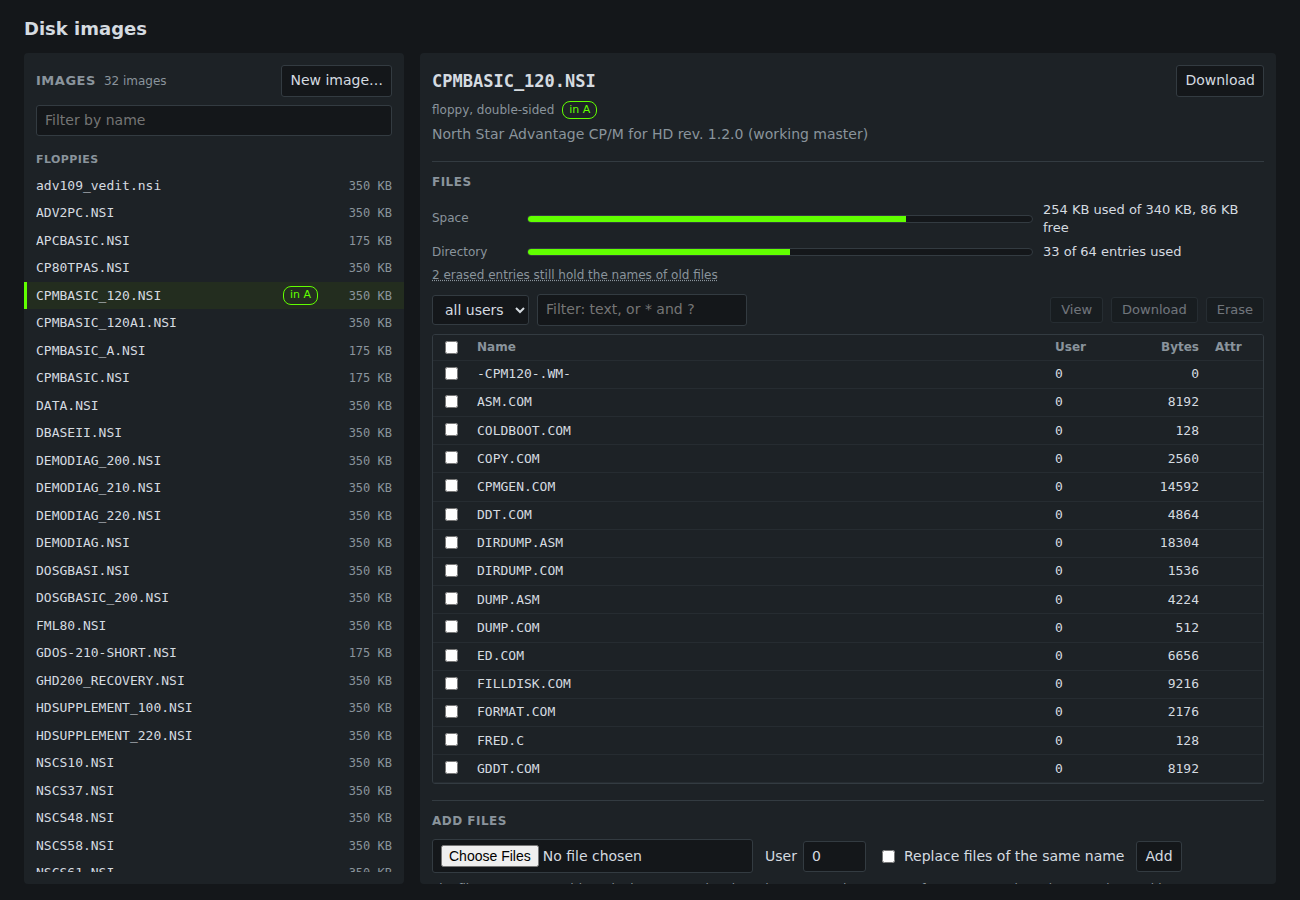
It shows how full a drive is, with bars for space and directory entries. A tab for each CP/M drive shows its files (a hard disk has up to 15), and an extra tab shows the NSDOS directory of a floppy. You can filter and sort the list, view a file as text or hex, download one or a zip of several, erase files, and add files. It also counts erased entries that still hold the name of an old file. CP/M erases a file by marking its entries free, so the name stays until the entry is used again, and the data may already be overwritten.
You can create a blank disk from the window, too. A floppy filled with E5 is not enough: the CP/M BIOS reads the North Star directory in sector 0, and with E5 or zeros there the guest saw “NO FILE” for files that nsdisk had put there. The blank floppy takes that sector from CPMBASIC_120 with the system entries replaced by separators.
Next
Part 3 is about the debugger, the serial terminal, and running the whole thing on an ESP32 board.