Using the previous sample, you can connect the crawled lists with a SPSRollUpChart to show a resume graph with the status of all tasks.
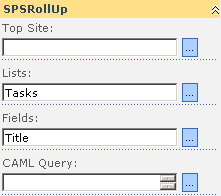
Our goal is show a chart with the status of all tasks in a specified task list. First create a SPSRollUp to select the lists as this
Add a SPSRollUpChart webpart an fill the properties with the same lists and in the fields property write “Status”, because we want get the status of the tasks.
This is a small sample to show all crawled lists, only the lists names without any other data.
Suppose that you want get all lists crawled under a specific site, send the list to another SPSRollUp webpart to show the lists items.
In this example we will use any site and we wish get all tasks related lists.
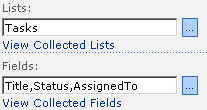
In the SPSRollUp properties, type “Tasks” in the lists properties and put “Title” in the fields property (we are not going to use the “Title” field but we need it, SPSRollUp must have almost one field in order to run the rollup)
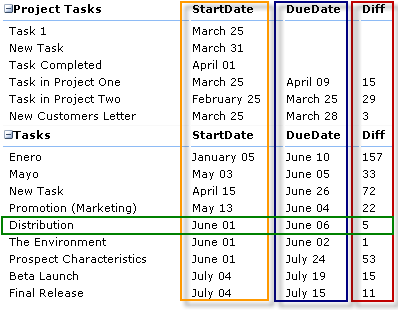
It’s another SPSRollUp Sample that show data from a tasks list in subsites. This view permits expand and collapse data and show the startdate, the duedate and the days from startdate to duedate.
In the SPSRollUp Properties, select the necesary tasks lists, use the fields, Title,StartDate,DueDate and select the ‘Use ISO dates’. In the XSL use the code below
This example use the DateDiff function from the SPSRollUp Namespace.
El otro día paso Unai por Pamplona y estuvimos cenando y departiendo sobre todas esas cosas frikis que nos gustan. Una suerte para los que habéis podido asistir a los cursos que ha impartido de Entity Framework y WCF.
Durante la cena, [[degustábamos unos “Penne Arrabiata” (no seáis mal pensados, que son macarrones con tomate un poco picante) y un “Ochoa Tempranillo” (recomendado)]], hablamos de; libros, de código, de más código, de bugs, de depuración, de tecnología, del bien y del mal (lo típico), no sé si ayer hablamos de sexo (no me acuerdo, pero con el frio que hacía es posible que no :-) .
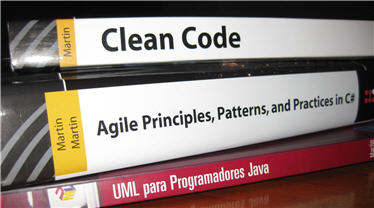
He terminado de leer el último libro de Robert C. Martin, Clean Code.
De Robert, había leído otros dos libros, “UML para programadores Java”, una guía práctica y sin rodeos de cómo usar UML en proyectos reales; y cuando digo práctica es que no se anda por las ramas y en ocasiones en un tono incluso “irónico” explica perfectamente cómo debemos usar UML.
El otro libro es Agile Principles, Patterns, and Practices in C# (Robert C. Martin Series), que puedo decir de este libro ampliamente comentado, uno de los que se deben tener. (Ya sabéis que se lo recomiendo a todo el mundo)
Como sabéis tanto Gustavo como yo llevamos tiempo realizando pruebas sobre lo que programamos en SharePoint, ambos estamos usando TypeMock como framework para
nuestros objetos Mocks que son imprescindibles a la hora de realizar pruebas para SharePoint.
Durante los últimos meses hemos posteado sobre el tema, hemos iniciado un proyecto en CodePlex con un conjunto de clases envoltorio que pueden ayudarnos a
la hora de realizar las pruebas con TypeMock y que está a un tris de quedarse obsoleto.
Aquí continúa el drama de Unit Test para SharePoint. Esta vez hemos reunido esfuerzos entre nosotros, Carlos Segura (http://www.ideseg.com ) y Gustavo Velez (http://www.gavd.net ), para intentar sacar algo en claro. Programadores del mundo de SharePoint, uníos! …
Unit Test, SharePoint y que es lo importante:
Testeo Unitario es una técnica de programación que permite asegurar que lo que se ha programado hoy cumple las condiciones exigidas, y que las seguirá cumpliendo en el futuro, cuando se hagan modificaciones en el código fuente. Existe numerosa información al respecto, tanto en libros de texto como en internet, así que no repetiremos las bases de la técnica; en resumen, es deseable que se
cumplan algunas condiciones: