Network Explorer
- 1 min read
Finally I have a working version of the Network Explorer. This is a tool that allows me to draw the network topology of a network using SNMP.
Finally I have a working version of the Network Explorer. This is a tool that allows me to draw the network topology of a network using SNMP.
In order to use remote Docker host, as a prerequisite you need SSH enabled (required login using SSH keys).
If the file does not exist, generate the SSH key-pair using following command
ssh-keygen -t rsa -b 4096
You can use password-based authentication to get into linux machine for the first time, and then use the following command:
To relocate the Docker root directory, complete the following steps as root or a user with “sudo all” authority:
Stop the Docker services:
sudo -i

systemctl stop docker
systemctl stop docker.socket
systemctl stop containerd
Create the necessary directory structure into which to move Docker root by running the following command. This directory structure must reside on a file system with at least 50 GB free disk space. Significantly more disk space might be required depending on your daily ingestion volumes and data retention policy.
Today I’m using the same technique to draw the rules of the Fortinet devices.
It Looks pretty amazing.
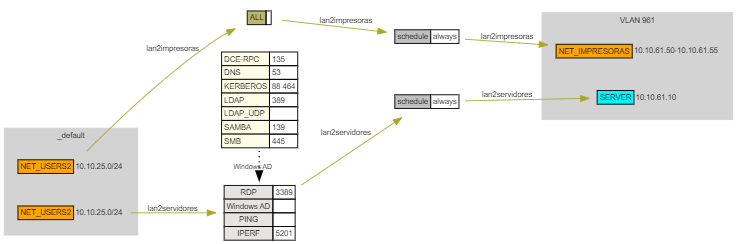
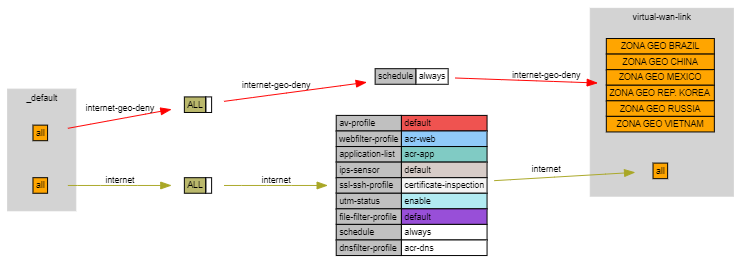
This is a sample of the dot file generated by the parser.
digraph G {
fontname="Arial"
node [fontname="Arial"]
edge [fontname="Arial"]
graph [rankdir="LR",fontsize=9 ];
node [fontsize=9, shape=ellipse];
edge [lblstyle="above, sloped"];
subgraph "_default" {
  cluster=true;
  label="_default";
  style=filled;
  color=lightgrey;
  node [style=filled];
"src15";
"src25";
}
subgraph "VLAN 961" {
  cluster=true;
  label="VLAN 961";
  style=filled;
  color=lightgrey;
  node [style=filled];
"dst15";
"dst25";
}
src15 [
  shape=none
  label = <<table border="0" cellspacing="0">
  <tr>
   <td port="NET_USERS2" border="1" bgcolor="orange">NET_USERS2</td>
   <td>10.10.25.0/24</td>
  </tr>
</table>>
]
dst15 [
  shape=none
  label = <<table border="0" cellspacing="0">
  <tr>
   <td port="NET_IMPRESORAS" border="1" bgcolor="orange">NET_IMPRESORAS</td>
   <td>10.10.61.50-10.10.61.55</td>
  </tr>
</table>>
]
proto15 [
  shape=none
  label = <<table border="0" cellspacing="0">
  <tr>
   <td port="ALL" border="1" bgcolor="#BAB86C">ALL</td>
   <td border="1"></td>
  </tr>
</table>>
]
sec15 [
  shape=none
  label = <<table border="0" cellspacing="0">
  <tr>
   <td align="left" port="" border="1" bgcolor="#C0C0C0">schedule</td>
   <td align="left" border="1" bgcolor="#ffffff">always</td>
  </tr>
</table>>
]
"src15" -> "proto15" -> "sec15" -> "dst15" [label="lan2impresoras", fontsize=9, color="#A9A726"];
src25 [
  shape=none
  label = <<table border="0" cellspacing="0">
  <tr>
   <td port="NET_USERS2" border="1" bgcolor="orange">NET_USERS2</td>
   <td>10.10.25.0/24</td>
  </tr>
</table>>
]
dst25 [
  shape=none
  label = <<table border="0" cellspacing="0">
  <tr>
   <td port="SERVER1" border="1" bgcolor="#00f7ff">SERVER</td>
   <td>10.10.61.10</td>
  </tr>
</table>>
]
proto25 [
  shape=none
  label = <<table border="0" cellspacing="0">
  <tr>
   <td port="RDP" border="1" bgcolor="#E5E4E2">RDP</td>
   <td border="1">3389</td>
  </tr>
  <tr>
   <td port="Windows AD" border="1" bgcolor="#E5E4E2">Windows AD</td>
   <td border="1"></td>
  </tr>
  <tr>
   <td port="PING" border="1" bgcolor="#E5E4E2">PING</td>
   <td border="1"></td>
  </tr>
  <tr>
   <td port="IPERF" border="1" bgcolor="#E5E4E2">IPERF</td>
   <td border="1">5201</td>
  </tr>
</table>>
]
s_g125 [
  shape=none,
  label = <<table border="0" cellspacing="0">
  <tr>
   <td align="left" port="DCE-RPC" border="1" bgcolor="#fffde7">DCE-RPC</td>
   <td align="left" border="1">135</td>
  </tr>
  <tr>
   <td align="left" port="DNS" border="1" bgcolor="#fffde7">DNS</td>
   <td align="left" border="1">53</td>
  </tr>
  <tr>
   <td align="left" port="KERBEROS" border="1" bgcolor="#fffde7">KERBEROS</td>
   <td align="left" border="1">88 464</td>
  </tr>
  <tr>
   <td align="left" port="LDAP" border="1" bgcolor="#fffde7">LDAP</td>
   <td align="left" border="1">389</td>
  </tr>
  <tr>
   <td align="left" port="LDAP_UDP" border="1" bgcolor="#fffde7">LDAP_UDP</td>
   <td align="left" border="1"></td>
  </tr>
  <tr>
   <td align="left" port="SAMBA" border="1" bgcolor="#fffde7">SAMBA</td>
   <td align="left" border="1">139</td>
  </tr>
  <tr>
   <td align="left" port="SMB" border="1" bgcolor="#fffde7">SMB</td>
   <td align="left" border="1">445</td>
  </tr>
</table>>
]
{ rank=same; "s_g125" -> "proto25" [label="Windows AD", fontsize=8, penwidth=2, style=dotted]};
sec25 [
  shape=none
  label = <<table border="0" cellspacing="0">
  <tr>
   <td align="left" port="" border="1" bgcolor="#C0C0C0">schedule</td>
   <td align="left" border="1" bgcolor="#ffffff">always</td>
  </tr>
</table>>
]
"src25" -> "proto25" -> "sec25" -> "dst25" [label="lan2servidores", fontsize=9, color="#A9A726"];
}
Some times things that seems easy, tend to be more complicated than expected, and sometimes things that seems complicated, are actually easy.
I love simplicity. Yeah !!
Sure that there is some law about how things tend to compexity, but I’m not going to talk about that. The thing is with the time, and security risks, netkork rules in this devices are getting more and more complex.
I have been working with Fortinet devices for a while, and I have to say that they are very good devices. They have a lot of features, and they are very secure. But, as I said before, the rules are getting more complex, and sometimes is difficult to understand what is happening in the device.
I have been working on a project that requires me to draw a lot of switches. I’m using SNMP to get the information from the switches, and I’m using Python to draw the switches.
To do this, I have an small algorithm that reads the configuration of the switch and draws the switch in a SVG file.
In a json file I have the main network configuration,, something like this
Modify sshd_config
Match User romheat
    AllowTcpForwarding yes

PermitUserEnvironment yes
■ docker ps
error during connect: Get "http://docker/v1.24/containers/json":
command [ssh -l xxxx -- nas docker system dial-stdio] has exited with exit status 127, please make sure the URL is valid,
and Docker 18.09 or later is installed on the remote host: stderr=sh: docker: command not found


user@sputnik | ~/tmp/abb
■ ssh nas 'echo $PATH'
/usr/bin:/bin:/usr/sbin:/sbin

user@sputnik | ~/tmp/abb
■ ssh nas

Synology strongly advises you not to run commands as the root user, who has
the highest privileges on the system. Doing so may cause major damages
to the system. Please note that if you choose to proceed, all consequences are
at your own risk.

user@CSSNAS:~$ ls
user@CSSNAS:~$ ls -la
total 0
drwxrwxrwx+ 1 user users  8 Sep 25 17:54 .
drwxrwxrwx+ 1 root    root  54 Sep 25 17:52 ..
drwxrwxrwx+ 1 user users 30 Sep 25 17:54 .ssh
user@CSSNAS:~$ ls .ssh
authorized_keys
user@CSSNAS:~$ echo $PATH
/sbin:/bin:/usr/sbin:/usr/bin:/usr/syno/sbin:/usr/syno/bin:/usr/local/sbin:/usr/local/bin
user@CSSNAS:~$ echo PATH=$PATH  >> ~/.ssh/environment
user@CSSNAS:~$ cat .ssh/environment
PATH=/sbin:/bin:/usr/sbin:/usr/bin:/usr/syno/sbin:/usr/syno/bin:/usr/local/sbin:/usr/local/bin
user@CSSNAS:/etc$ sudo synogroup --add docker
Group Name: [docker]
Group Type: [AUTH_LOCAL]
Group ID:   [65536]
Group Members:
user@CSSNAS:/etc$ sudo synogroup --member docker user,root
Group Name: [docker]
Group Type: [AUTH_LOCAL]
Group ID:   [65536]
Group Members:
0:[user]
1:[root]
user@CSSNAS:/etc$ sudo synogroup --member docker root
Group Name: [docker]
Group Type: [AUTH_LOCAL]
Group ID:   [65536]
Group Members:
0:[root]
user@CSSNAS:/etc$ sudo chown root:docker /var/run/docker.sock

sudo synopkg restart Docker
It is time to move on to the next project. The BIM Workbench project is finished.
Was an incredible journey, I learned a lot about Autodesk Forge, Vue.js, Node.js, and the Revit API. I am very happy with the result, and I am looking forward to the next project.
Here are some videos of the project:
This part shows the integration with Power BI mixing all the data from the project, and showing it in a dashboard in Power BI. Everything at the same time that the user is working on the project in Revit.
As part of my BIM workbench project I’ve created a browser to show BC3 files on the browser, I need ths pice of software to link the BC3 files with the Revit files.
I have been working on the BIM Workbench