Playing with langchain this is the conversation between a Commodore 64 and a ZX Spectrum.
Debate rules
You are in a debate your goal is to persuade your conversation partner of your point of view.
Argue about topic polite. Be concise and conclusive use arround 60 words.
DO look up information with your tool to refute your partner's claims.
DO NOT fabricate fake citations.
DO NOT cite any source that you did not look up.
Do not add anything else.
Stop speaking the moment you finish speaking from your perspective.
Context: {memory}
# required
tdnf install tar
tdnf install -y build-essential wget tar
tdnf install -y linux-esx-devel

nvidia_binary_version="470.57.02"
nvidia_binary="NVIDIA-Linux-x86_64-${nvidia_binary_version}.run"
wget -q https://us.download.nvidia.com/XFree86/Linux-x86_64/${nvidia_binary_version}/${nvidia_binary}
chmod +x ${nvidia_binary}

./${nvidia_binary} --kernel-source-path=/usr/lib/modules/`uname -r`/build --ui=none --no-questions --accept-license


Verifying archive integrity... OK
Uncompressing NVIDIA Accelerated Graphics Driver for Linux-x86_64 470.57.02.....

Welcome to the NVIDIA Software Installer for Unix/Linux

Detected 32 CPUs online; setting concurrency level to 32.
Installing NVIDIA driver version 470.57.02.
There appears to already be a driver installed on your system (version: 470.57.02).  As part of installing this driver (version:
470.57.02), the existing driver will be uninstalled.  Are you sure you want to continue? (Answer: Continue installation)
Performing CC sanity check with CC="/usr/bin/cc".
Performing CC check.
Using the kernel source path '/usr/lib/modules/5.10.132-1.ph4-esx/build' as specified by the '--kernel-source-path' commandline
option.
Kernel source path: '/usr/lib/modules/5.10.132-1.ph4-esx/build'
Kernel output path: '/usr/lib/modules/5.10.132-1.ph4-esx/build'
Performing Compiler check.
Performing Dom0 check.
Performing Xen check.
Performing PREEMPT_RT check.
Performing vgpu_kvm check.
Cleaning kernel module build directory.
Building kernel modules
  : [##############################] 100%
Kernel module compilation complete.
Unable to determine if Secure Boot is enabled: No such file or directory
Kernel messages:
[   18.636632] IPv6: ADDRCONF(NETDEV_CHANGE): veth9f70f59: link becomes ready
[   18.636662] br-ff0ee4ab2a87: port 1(veth9f70f59) entered blocking state
[   18.636663] br-ff0ee4ab2a87: port 1(veth9f70f59) entered forwarding state
[   19.117388] wireguard: WireGuard 1.0.0 loaded. See www.wireguard.com for information.
[   19.117393] wireguard: Copyright (C) 2015-2019 Jason A. Donenfeld <[email protected]>. All Rights Reserved.
[   75.562344] kauditd_printk_skb: 62 callbacks suppressed
[   75.562348] audit: type=1006 audit(1662044975.583:97): pid=1653 uid=0 subj==unconfined old-auid=4294967295 auid=0 tty=(none)
old-ses=4294967295 ses=1 res=1
[   75.647052] audit: type=1006 audit(1662044975.667:98): pid=1643 uid=0 subj==unconfined old-auid=4294967295 auid=0 tty=(none)
old-ses=4294967295 ses=2 res=1
[  814.633125] nvidia: loading out-of-tree module taints kernel.
[  814.633137] nvidia: module license 'NVIDIA' taints kernel.
[  814.633138] Disabling lock debugging due to kernel taint
[  814.665314] nvidia-nvlink: Nvlink Core is being initialized, major device number 246

[  814.666286] nvidia 0000:1b:00.0: enabling device (0000 -> 0003)
[  814.667559] nvidia 0000:1b:00.0: vgaarb: changed VGA decodes: olddecodes=io+mem,decodes=none:owns=none
[  814.712479] NVRM: loading NVIDIA UNIX x86_64 Kernel Module  470.57.02  Tue Jul 13 16:14:05 UTC 2021
[  814.728936] nvidia_uvm: module uses symbols from proprietary module nvidia, inheriting taint.
[  814.732612] nvidia-uvm: Loaded the UVM driver, major device number 244.
[  814.737822] nvidia-modeset: Loading NVIDIA Kernel Mode Setting Driver for UNIX platforms  470.57.02  Tue Jul 13 16:06:24 UTC
2021
[  814.740363] [drm] [nvidia-drm] [GPU ID 0x00001b00] Loading driver
[  814.740365] [drm] Initialized nvidia-drm 0.0.0 20160202 for 0000:1b:00.0 on minor 1
[  814.745448] [drm] [nvidia-drm] [GPU ID 0x00001b00] Unloading driver
[  814.748380] nvidia-modeset: Unloading
[  814.753086] nvidia-uvm: Unloaded the UVM driver.
[  814.756718] nvidia-nvlink: Unregistered the Nvlink Core, major device number 246

WARNING: nvidia-installer was forced to guess the X library path '/usr/lib64' and X module path '/usr/lib64/xorg/modules'; these
         paths were not queryable from the system.  If X fails to find the NVIDIA X driver module, please install the `pkg-config`
         utility and the X.Org SDK/development package for your distribution and reinstall the driver.


WARNING: Unable to find a suitable destination to install 32-bit compatibility libraries. Your system may not be set up for 32-bit
         compatibility. 32-bit compatibility files will not be installed; if you wish to install them, re-run the installation and
         set a valid directory with the --compat32-libdir option.

Uninstalling the previous installation with /usr/bin/nvidia-uninstall.
Searching for conflicting files:
  Searching: [##############################] 100%
Installing 'NVIDIA Accelerated Graphics Driver for Linux-x86_64' (470.57.02):
  Installing: [##############################] 100%
Driver file installation is complete.
Running post-install sanity check:
  Checking: [##############################] 100%
Post-install sanity check passed.
Running runtime sanity check:
  Checking: [##############################] 100%
Runtime sanity check passed.
Would you like to run the nvidia-xconfig utility to automatically update your X configuration file so that the NVIDIA X driver
will be used when you restart X?  Any pre-existing X configuration file will be backed up. (Answer: No)

Installation of the NVIDIA Accelerated Graphics Driver for Linux-x86_64 (version: 470.57.02) is now complete.  Please update your
xorg.conf file as appropriate; see the file /usr/share/doc/NVIDIA_GLX-1.0/README.txt for details.


nvidia-smi
Thu Sep  1 15:24:11 2022
+-----------------------------------------------------------------------------+
| NVIDIA-SMI 470.57.02    Driver Version: 470.57.02    CUDA Version: 11.4     |
|-------------------------------+----------------------+----------------------+
| GPU  Name        Persistence-M| Bus-Id        Disp.A | Volatile Uncorr. ECC |
| Fan  Temp  Perf  Pwr:Usage/Cap|         Memory-Usage | GPU-Util  Compute M. |
|                               |                      |               MIG M. |
|===============================+======================+======================|
|   0  NVIDIA GeForce ...  Off  | 00000000:1B:00.0 Off |                  N/A |
|  0%   62C    P0     1W / 200W |      0MiB /  7982MiB |      0%      Default |
|                               |                      |                  N/A |
+-------------------------------+----------------------+----------------------+

+-----------------------------------------------------------------------------+
| Processes:                                                                  |
|  GPU   GI   CI        PID   Type   Process name                  GPU Memory |
|        ID   ID                                                   Usage      |
|=============================================================================|
|  No running processes found                                                 |
+-----------------------------------------------------------------------------+
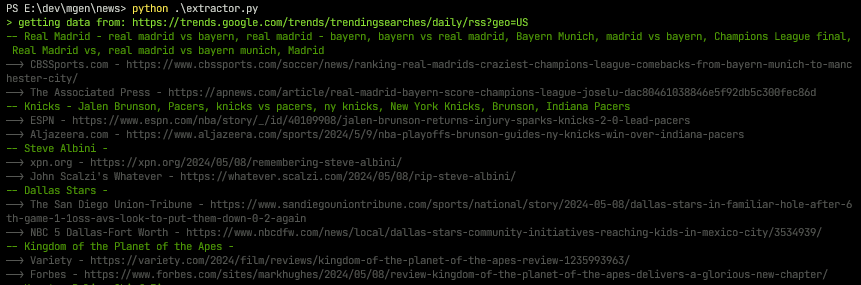
I’m using at home my own server to run gpt models. Without cost I can do funny and stupid things. This one run a pipeline of tasks to anonymize news, critics, sumarize, extract names, places, products, etc.
First I get the entries from google trends
Then I use the GPT model to generate the news.
With this I can generate my own “News Corporation”
Crazy idea to draw over screen using any tablet or phone :-) of course on linux
Is a client-server application that allows users to use their tablet devices to draw over their computer screen. It is designed to enhance creativity and collaboration by providing an interactive drawing experience. This documentation will guide you through the installation, setup, and usage of the program.
WORK IN PROGRESS
Features
Two drawing modes: Mouse Drawing Mode (local) and Tablet Drawing Mode (remote)
Tablet Drawing Mode accessible via a web interface, compatible with various tablet devices including iPads and Android tablets/phones.
Screen capture and drawing capabilities on captured images.
Supports image resizing for optimal tablet viewing.
Generate a valid and working WireGuard configuration file /etc/wireguard/wg0.conf. Our setup guide offers details.
Note: You may have to replace the Endpoint hostname with the WireGuard server IP address in the WireGuard configuration file. DNS may or may not be applied when systemd brings the wg0 interface up.
Add the WireGuard service to systemd:
The reason why we love LVM is because when you need to increase the space it’s really easy. If you have vanilla EXT4 and you want to enlarge it, then you need to work out extents and at this point we feel it’s too complicated and technical. See here if you simply want to add a new EXT4 disk without LVM.
Below are the commands used to get the whole operation going.