Days ago I wrote about how to use msbee to do webparts with Visual Studio 2005, now the toolkit guys have a beta version, I have spent the weekend doing some tests with this beta release and now I’m doing my webparts using Visual Studio 2005. In the beginning I was using the external tools menu to launch the msbuild process with apropiate targets, and later launching other tool with the sign assembly process, finally I have modified the .csproj file because at the moment for SharePoint 2003 I only need use the Net 1.1 framework. Also I added at the Postbuild event the sign assembly process.
Hoy tocaba mantenimiento del Servidor SQL, revisión de espacio, compactación de bases de datos etc… (cosas del primer martes de cada mes) en fin una vez más nuestro portal crece desmesuradamente sobre todo el log de transacciones (como ocurre con todas las bbdd que se usan) así que como hoy no tenia nada más interesante que contar aquí quedan algunas de las tsqls que forman parte del pan de mantenimiento (yo prefiero hacerlo a mano, usando un PA en vez de usar el asistente programado, manias)
Changing the dav web query, you can get more data (see urn:content-classes:message and Default Exchange Store Namespaces for other namespaces) now to complete the sample the new query is
SELECT"urn:schemas:httpmail:datereceived",
"DAV:href",
"urn:schemas:httpmail:sendername",
"urn:schemas:httpmail:subject"FROMscope('shallow traversal of ')
WHERE"DAV:ishidden"=FalseAND"DAV:isfolder"=False
And to watch the xml results obtained by the query we can modify the checkState function.
functioncheckState()
{
if (xmlHttpReq.readyState==4)
{
divOutput.innerText=xmlHttpReq.ResponseXML.xml;
}
}
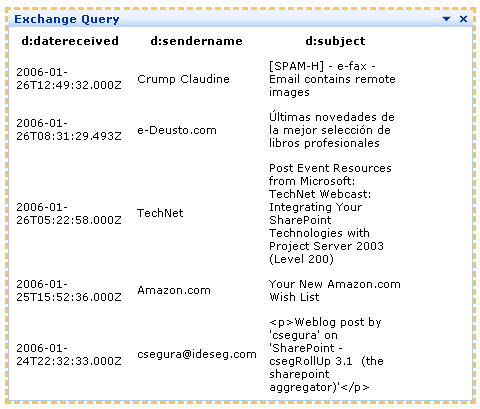
Better than parse DOM to get the results I prefer use XSL, now I can copy the XML results in my favorite XSLT editor and map the data. After I can add the xsl to the page and transform the xml usig it. The final result is as shown in the image.
Some time ago I write a post with a little trick to add this “missed” option [“View all folders” in Document Libraries]. Now I have needed it in all my documents libraries and the best option is as always modify the list schema file.
Each list definition contains a schema.xml that defines the views, forms, toolbar, and special fields in a list definition. In my production server I have modified the DOCLIB template in “web server extensions\60\TEMPLATE\3082\STS\LISTS\DOCLIB”
We can use asynchronous data retrieval, inside of a WebContent webpart, this is a little sample of how to do it.
Part 1
Querying an exchange server and retry results inside of sharepoint webpart, this first sample use the Search web dav method using XMLHTTP request (Exchange Store WebDAV Protocol), query the last five elements from user inbox and gets the date received, the sender name and the subject.
– Queries with fields that contains spaces
– Variables in caml queries
– Other minor bugs
Improvements (awaited :-) )
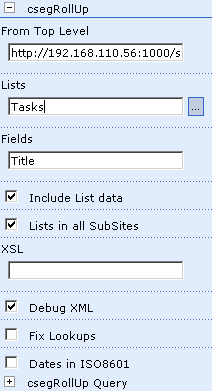
Now there is a new property “From top level” where you can specify the starting point from which the csegrollup would gather the information, this url can be a site or a portal area. The format is an Url format (http://sever/sites/site or http://server/area), Now you can use csegRollUp in an area and rollup content from sites in other areas or others urls, also you can use csegRollUp in a site/subsite and agregate content from a top site.
Estos días he estado probando algunas cosas con SharePoint, empecé instalando la versión inglesa del Business Scorecard Manager 2005 ya que no aguantaba más de esperar a la versión en castellano (las ayudas por lo menos están pero el programa no), después de instalar los requisitos necesarios en mi maquina de pruebas…
Probé a instalar el producto … que fallaba estrepitosamente al crear la base de datos :-( probé después con un SQL Server 2000 y me seguía ocurriendo lo mismo, comprobé todos los permisos en uno y otro sitio y tras una hora conseguí que me creará la base de datos. Lo que hice fue instalarla directamente sobre el servidor SQL, instalando las opciones personalizadas diciéndole que no a todo excepto a la base de datos. Bien, ya tenía la BBDD instalada, ahora me quedaba instalar las webparts en el servidor (el resto de componentes de la instalación), no hubo suerte, tras indicar al programa de instalación dónde se encuentra en servidor SQL y el nombre de la BBDD me da un error tal que:
First I want to give thanks to Josh Ledgard to allow to me test the first CTP of MSBee. With MSBee you can build .NET 1.1 projects using Visual Studio 2005. MSBee is designed to use MSBuild and use a property to set the target framework. MSBee map assembly references from .NET 2.0 assemblies to their .NET 1.1 equivalents.
Installation and usage
This first release install unzipping four files in the MSBuild directory. These files contans the NET 1.1 target files and the small msbee.dll. After install you only need open a Visual Studio 2003 project with Visual Studio 2005, locate the project file (.csproj) and insert a line under
I have a stopped project that I want release in the nexts weeks, it’s called csegDocLibTools, this is a webpart to show a explorer like interface in document libraries and adds cut and paste features.
SharePoint – Making document libraries a bit more explorer-like
SharePoint – Making document libraries a bit more explorer-like – csegDocLibTools
Now here is the beta release, any feedback get will be great.