Otra de las mejoras importantes al usar las WebParts de ASP.Net 2.0 es la comunicación entre webparts, ya que ahora pasa a ser un proceso mucho menos tedioso que con las webparts de WSS2.
¿Qué necesitamos?
Lo primero que necesitamos es ver que información es la que queremos intercambiar entre las dos webparts, con las webparts de ASP Net 2.0 no tenemos las limitaciones que teníamos antes con la obligación de seleccionar uno de los interfaces que WSS2 nos proponía. Ahora disponemos de libertad para intercambiar información.
Siguiendo con lo expuesto anteriormente, lo primero es revisar el formato en que se exportan las webparts basadas en Asp.Net 2.0. Una vez exportado nuestro webpart lo primero que vemos es que la extensión a cambiado, de .dwp (las webparts de WSS2) a .webpart
También podemos observar que el espacio de nombres corresponde con la v3 , esto solo ocurre con las webparts nativas ya que por compatibilidad las webparts que usen la api Microsoft.SharePoint.WebPart, mantendrán el formato .dwp
Continuando con el post anterior, usando las características de las WebParts de ASP Net 2.0, podemos añadir propiedades a nuestras webparts para que se muestren en el area de edición.
using System.Web.UI;
using System.Web.UI.WebControls.WebParts;
namespace MiWebPart
{
publicclassMiPrimerWebPart : WebPart
{
privatebool bMensajeVisible = true;
[Personalizable(PersonalizationScope.Shared),
WebBrowsable,
WebDisplayName("Ver 2º Mensaje"),
WebDescription("Activar desactivar el 2º mensaje")]publicbool MensajeVisible
{
get { return bMensajeVisible; }
set { bMensajeVisible = value; }
}
protectedoverridevoid RenderContents(HtmlTextWriter writer)
{
writer.Write(“Hola Mundillo!!”);
if (bMensajeVisible)
{
writer.Write(“<br><b>Hola Mundillo!! Otra vez</b>”);
}
base.RenderContents(writer);
}
}
}
Para ello basta con decorar las propiedades con los atributos necesarios. En este caso el atributo Personalizable indica que el valor de la propiedad se guardará cuando este se modifique, para que una propiedad pueda marcarse con el atributo Personalizable debe cumplir lo siguiente:
Como ya sabéis Windows SharePoints Services 3.0 está construido sobre ASP.Net 2.0, esto nos brinda la posibilidad de crear webparts que podríamos llamar nativas de ASP.Net 2.0 dentro de WSS3, estas webparts nativas vendrían derivados de System.Web.UI.WebControls.WebParts.WebPart.
Para mantener la compatibilidad (como prometieron) con desarrollos anteriores y para no perder la funcionalidad de ASP.Net 2.0 la antigua API Microsoft.SharePoint.WebPartPages.WebPart que hemos venido usando con WSS2 deriva ahora de System.Web.UI.WebControls.WebParts.WebPart.
De manera que ahora disponemos de dos alternativas a la hora de desarrollar para WSS3 siempre moviéndonos en ASP.Net 2.0.
Hace ya algún tiempo que escribí CS-Solver, estos días me he propuesto convertirlo de VBA a VSTO.
CS-Solver es un add-in para Excel que escribí hace algún tiempo, ya que la calculadora que usaba tenía un sistema de resolver ecuaciones muy parecido (PowerOne finance) y sin embargo resolver ecuaciones con Excel era bastante más complicado.
CS-Solver utiliza el método secante para encontrar las raíces de f(x)=0 en un intervalo, este no es tan rápido como el de Newton, pero si más rápido que la bisección ya que acota el intervalo y usa la aproximación más reciente.
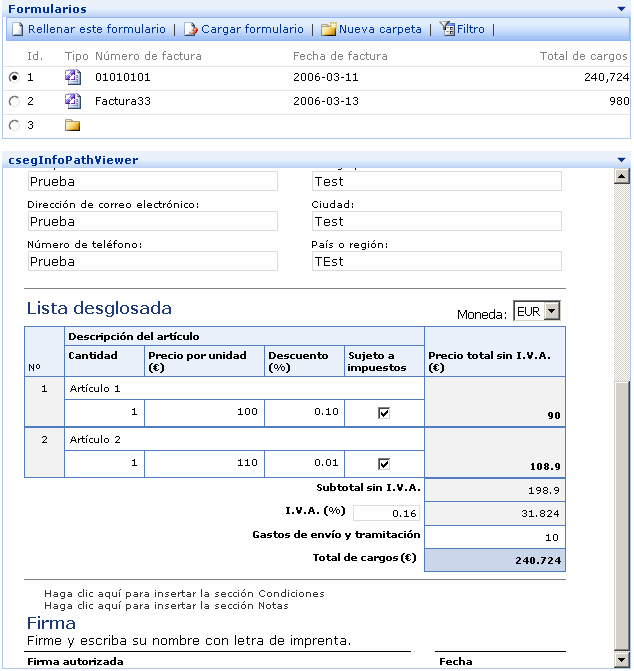
You can use now the row provider to select the infopath form (rememeber that the view need contains the ID field).
The problems rendering fields with special characters is now solved.
Also I added a cell consumer interface to get the ID from other webpart as csegRollUp
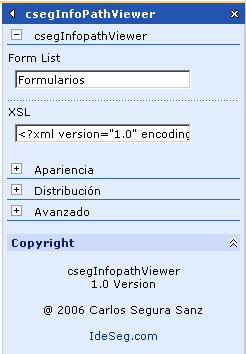
In the properties you need add the XSL (see previous version) and the name of the form library.
If you can´t display the infopath form, check if you can get the XML from the server using the form Url. Some users are using a WSS environment where they don´t use DNS to resolve the url where WSS is located, they are using an entry in the hosts file. In this case the server can´t resolve the Url where the form is located. To solve this issue you can add the host name in the hosts file of your server.
Finally is here, many thanks to the people who have tested this version.
From the forums:
“I had rolled back to 3.1a with 22 individual imported spreadsheet lists rolling up to 22 individual web part pages; with 3 additional web part pages rolling up some specified fields from all 22 lists.”
ALL 25 Rollups where present, accounted for and functioning as expected under 3.5 FINAL’s smooth control. Very, Very Smooth Transition
Well, so many people ask to me because csegSmallCalendar has not a filter interface to use with any list. And the answer is, I forget it. Now the webpart has a FilterProvider interface to filter any list. Also you can display a “clear filter” button to clear the filter on list. As always some screenshots…
This is other sample of how I am using Ajax in my SharePoint environment (see Using Ajax to query Exchange Server Part 1 and Part 2) , now I’m using it to improve my searches in SPS.
First I have added a new page to make the searches, this new page runs under SPS context and it is stored under Layouts directory. This is very basic search page that look at the “DAV:displayname” field to locate files that contains a keyword in the name. This page use a query string to get the keyword and the results are written in HTML. (You can use other queries here).
I continue working in my csegSharePoint library. Meanwhile I’m doing some test with this, as this webpart that is a small calendar that show a date field from a list, and it allows select the dates witth entries, and provide a cell value with the date. You can select the List and the Field and the styles to draw the calendar.
Also you can use this with csegRollUp to filter by dates, using [CellProvider] in queries.