In this sample we load a DropDown list with values from a list and we will use the selected value to filter another SPSRollUp.
Select a List and a Site from which we load data, and fill the SPSRollUp properties.
Use the next XSL to render the DropDown list, (we are using the field Title in the example)
<?xml version="1.0" encoding="utf-8"?><xsl:stylesheetversion="1.0"xmlns:xsl="http://www.w3.org/1999/XSL/Transform"xmlns:sps="http://schemas.spsprofessional.com/WebParts/SPSXSLT"exclude-result-prefixes="sps"><xsl:outputmethod="html"/><xsl:paramname="CurrentRow"/><xsl:templatematch="/"><![CDATA[
<script type="text/javascript">
function combo_onchange(oSelect)
{
if(oSelect.selectedIndex != -1)
{
var selected = oSelect.options[oSelect.selectedIndex].value;
]]><xsl:value-ofselect="sps:EventJS('Select','selected')"/><![CDATA[
}
}
</script>
]]> Select a value
<selectid="a1"name="combo"onchange="javascript:combo_onchange(this);"class="ms-input"><optionvalue=""/><xsl:for-eachselect="Rows/Row"><xsl:sortselect="Title"/><xsl:elementname="option"><xsl:attributename="value"><xsl:value-ofselect="_RowNumber"/></xsl:attribute><xsl:iftest="_RowNumber=$CurrentRow"><xsl:attributename ="selected"/></xsl:if><xsl:value-ofselect="Title"/></xsl:element></xsl:for-each></select></xsl:template></xsl:stylesheet>
This XSL render the DropDown list, generating an option for each row returned in XML. When you select an option the javascript onchange event, send all row values using the provider interface.
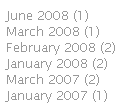
This is a small trick to show the entries classic list in months and years that can be found in blogs.
To produce a data input such as this one we must count the number of entries occurred in a given month and year.
This is a complex result from the point of view of an XSLT transformation, but here we will see how we can use JavaScript alongside with our transformation to produce the necessary results.
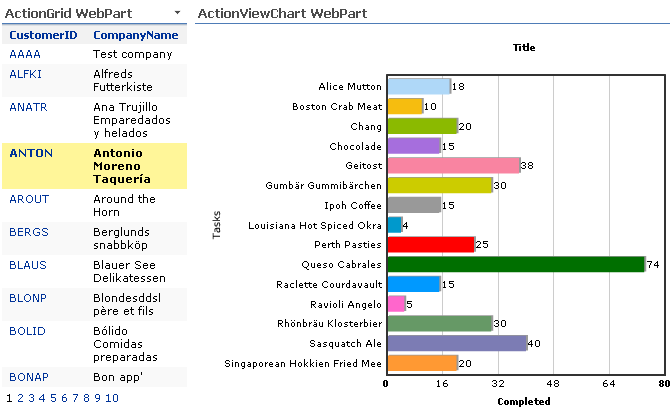
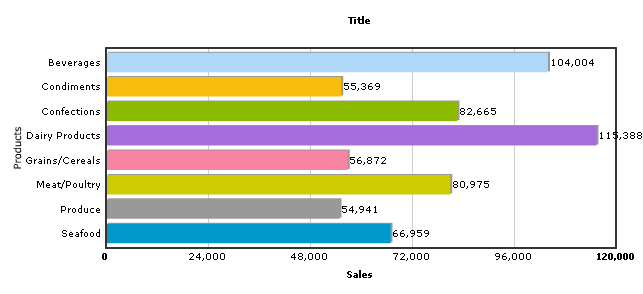
An ActionGrid connected to an ActionViewChart to show in graph form all products and your quantity ordered by a customer
ActionViewChart XML Configuration
<?xml version="1.0" encoding="utf-16"?><SPSActionViewConfig><DataBaseConnectionString=" ... "/><QuerySelectCommand="SELECT SUM([Order Details].Quantity) AS Quantity,
Products.ProductName
FROM [Order Details]
INNER JOIN Orders
ON [Order Details].OrderID = Orders.OrderID
INNER JOIN Products
ON [Order Details].ProductID = Products.ProductID
WHERE Orders.CustomerID=@CustomerID
GROUP BY Products.ProductName"/><Filter><ParamName="CustomerID"Type="NChar"Default=""/></Filter></SPSActionViewConfig>
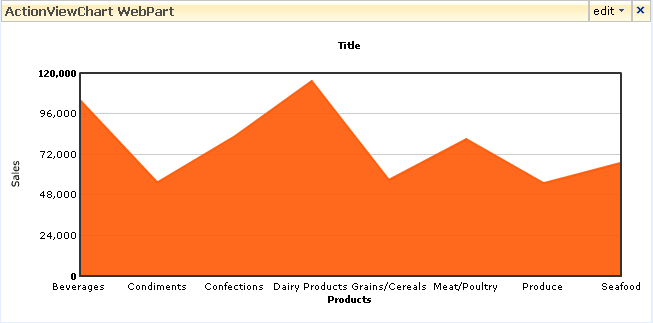
<?xml version="1.0" encoding="utf-16"?><SPSActionViewConfig><DataBaseConnectionString="Data Source=W2K3;Initial Catalog=Northwind; .."/><QuerySelectCommand="SELECT CategoryID, CategoryName, SUM(ProductSales) AS Total
FROM [Sales by Category]
GROUP BY CategoryName, CategoryID"/></SPSActionViewConfig>
XSLT
<?xml version="1.0" encoding="utf-8"?><xsl:stylesheetversion="1.0"xmlns:xsl="http://www.w3.org/1999/XSL/Transform"xmlns:msxsl="urn:schemas-microsoft-com:xslt"xmlns:sps="http://schemas.spsprofessional.com/WebParts/SPSXSLT"exclude-result-prefixes="msxsl sps"><xsl:outputmethod="xml"indent="yes"/><xsl:templatematch="@* | node()"><!-- Graph --><graphcaption="Title"xAxisName="Products"yAxisName="Sales"decimalPrecision="0"formatNumberScale="0"><xsl:apply-templates/></graph></xsl:template><!-- Each row --><xsl:templatematch="Row"><!-- Put here your fields --><setname="{CategoryName}"value="{Total}"color="{sps:GetFcColor()}"/></xsl:template></xsl:stylesheet>
Esto post es para recordar simplemente que concatenar cadenas con String.Format es una mala práctica y para eso tenemos ese gran olvidado que es String.Concat.
Y como muestra un ejemplo…
publicvoid Format()
{
for (int i = 0; i < 1000; i++)
{
String.Format("{0},{1}", "Test", "Test");
}
}
publicvoid Concat()
{
for (int i = 0; i < 1000; i++)
{
String.Concat("Test",",", "Test");
}
}
Agenda:
18:30 – 19:00. Reunión del grupo de usuarios navarraDotNet. Orden del día: nuestros saraos
19:00 – 21:00. Desarrollar software no es sólo picar codigo. Unai Zorrilla y Carlos Segura.
El viernes tuvimos una charla en el grupo de usuarios llamada “MDA para dummies”, en la que David Marzo de Solnatec, nos explico varias cosas sobre la arquitectura dirigida por modelos, hasta aquí, todo normal y corriente, una charla bien organizada y dada por alguien que controla, ¿Qué más se puede pedir?.
Pero lo excepcional, es que David, lleva trabajando durante años en su propio sistema MDA, sistema que permite definir modelos mediante archivos XML y ser procesados para generar código, algo similar a lo que hace CodeSmith, con la salvedad de que el modelo no parte de la Base de datos, si no que se define en un lenguaje basado en XML que el mismo ha diseñado y que pude ser extendido.
Lugar: Sistema Formacion. Plaza Pintor Paret, 1. 31008 Pamplona
Colaboran: Sistema Formación, Masbytes, Solnatec, navarraDotNet, MSDN
Ponente: David Marzo. Solnatec, navarraDotNet
Agenda:
18:30 – 19:00: Reunión de navarraDotNet. Orden del día: nuestros saraos
19:00 – 20:30: “MDA para Dummies, continuación…”. David Marzo. Solnatec. (http://www.solnatec.com)
Demostración de uso de una herramienta MDA en el día a día de un desarrollador.