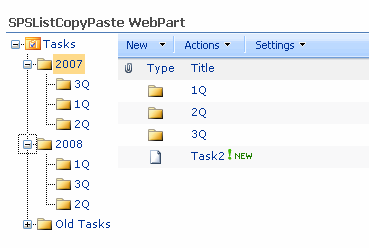
This are the preliminary screenshots of SPSListCopyMove WebPart, this webpart permits move and copy list items in a SharePoint List. In the webpart properties you only need specify the list and the view that you want show in the webpart.
You can view a navigation tree, to navigate to any list folder quickly, and the list view that you has selected in the properties.
In the context menu of the items that are showed in the view there are two new options, one to copy the item to another folder in the same list and another to move the item.
Muchos de los desarrolladores de SharePoint, terminan optando por desplegar sus aplicaciones en el GAC, para evitar problemas de seguridad. Esta no es la manera más correcta y cada vez más administradores de sistemas, exigen que las soluciones se desplieguen en los directorios de aplicación.
Los ensamblados que se ejecutan desde el GAC, se ejecutan bajo total confianza (Full Trust) y están disponibles para todos los servidores virtuales y todas las aplicaciones, lo cual termina siendo menos seguro si desconocemos la procedencia del ensamblado, cosa que ocurre con frecuencia.
We are developing an application for a customer using SPSRollUp (Beta 2), our customer want a site with some features that seem like BaseCamp site, BaseCamp is a well know Project Management web application.
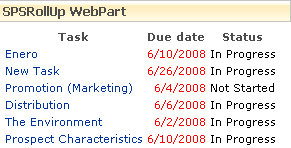
Using SPSRollUp our customer can aggregate data from sub-projects and show all tasks status in an only view. But he want a special view that he likes specially, this view show pending tasks whit delayed days and coming tasks with the remaining days.
Hace algún tiempo comente un plan de mantenimiento para las bases de datos de SharePoint 2003, básicamente para SharePoint 2007 los pasos son los mismos, solo que las bases de datos a tener en cuenta son otras.
Tanto en MOSS como en WSS encontraremos las siguientes bases de datos:
WSS_Content_GUID
Esta base de datos contiene los datos de una aplicación web y las colecciones de sitios de dicha aplicación web. Todos los datos de las listas y los documentos de los sitios son almacenados en esta base de datos, en función del movimiento de esta deberemos de tener un plan de mantenimiento para la misma. Importante.
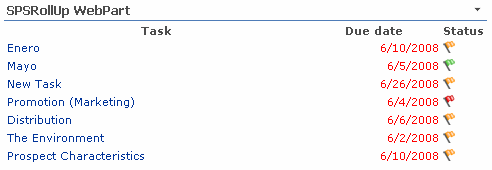
You can replace texts with custom images using the XSL. First you need load the desired images in the /_layouts/images of your server, after load you can use this images from XSL. Here is a little sample where the status of the tasks are replaced with flag images.
The XSL is the same used in the Task Status example, where we are add a xsl:choose in order to select the image:
This is only a sample to show how we can use SPSRollUp to show the pending tasks from a list.
Select a Task list in the SPSRollUp properties, and select fields Title,DueDate and Status, check the include list data to get the url where you can edit the task item.
Below there are some CAML queries that you can use to filter the results and show only the pending tasks or the tasks for the current logged user.
Included in version 2 of SPSRollUp there is a new webpart to roll up data and show it using the SharePoint calendar view.
SPSRollUpCalendar has a similar operation to the SPSRollUp and SPSRollUpChart, and this means that it tracks sites and lists collecting information, the collected data is transformed using XSLT to generate XML as SPSRollUpChart does. The result XML is a description of the events to show in a calendar view.
With SPSRollUp you can also aggregate content from Picture Libraries, this is a little sample that shows you how to do it.
Select the desired lists that you want to aggregate and add the fields in the fields list, the most important field here is the EncodedAbsThumbnailUrl, this field contains the Url where the thumbnail image is stored. Other fields that we are using in the example are Title, Description and Keywords.
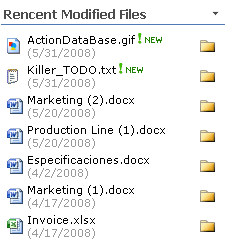
A common recurrence task in SharePoint is to locate the last modified files. SPSRollUp can help to you in this task.
You can use SPSRollUp to retrieve items from a document library as it is shown in the image.
You are supposed to select in the lists the document libraries in which you want crawl the results, and, in the fields you must select:
FileRef: That is the file name with full path.
LinkFileName: That is the file name, without path.
EncodedAbsUrl: That is the full path of the file, without file name.
Modified: The date and time when the document was modified.
Created: The date and time when the document was created.